


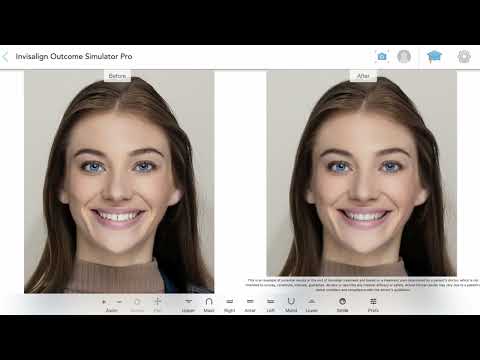

Surveyed doctors estimated a 50% increase in Invisalign® case starts with Invisalign® Outcome Simulator Pro. #*
Increase chairside conversions.
Learn more Request demo
Experience the benefits of Invisalign® Outcome Simulator Pro,
now with new features:
Simulated in-face visualisation is powered by advanced algorithms, providing a realistic simulation of their future smile† that can further the discussion on treatment options.

The simulation automatically begins running in the background, allowing you to use other iTero™ digital tools to support oral health conversations.
Enhanced simulation preferences to account for extractions, missing teeth, spaces and unmoveable teeth.
Expand what’s possible for your practice.
Having an iTero scanner in your practice is about having options. Like being able to provide a standard of care that puts you above the competition. Like offering a patient experience that has them more likely to keep coming back and make recommendations to help you grow your practice. And by making for a seamless connection no matter whether you’re working with peers, partners, or patients.

Engage your patients with powerful visualisation tools
The iTero scanner equips your team with the tools to take patient engagement to the next level. Features like Occlusogram and Invisalign Outcome Simulator Pro# support oral health conversations when sharing treatment plans and progress at each visit**.

Improve workflow efficiency
Streamline your workflow with features such as the iTero Auto-Upload feature^, which automatically uploads scan images in place of intraoral photos — saving you time with Invisalign case submission and enhancing the patient experience.

Deliver on predictability and repeatability
Improve your treatment planning, accuracy, and monitoring across your workflow. The Invisalign Progress Assessment tool enables you to treat patients with confidence and predictability.

Seamless connectivity with Invisalign treatment
Make your life easier from the initial scan with the iTero scanner, to instantly connect into your Invisalign Doctor Site and Clincheck® treatment plans.

Enhance your diagnosis and treatment planning capabilities
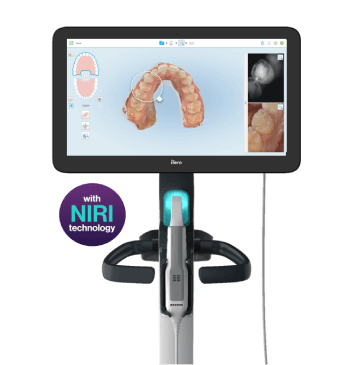
Strengthen your patient engagement with powerful tools such as iTeroTM NIRI technology, which can aid in the detection of interproximal caries, and an integrated 3D intraoral camera for viewing each tooth in detail with a wide-angle view of the scanning area.
Streamline your workflow with the iTero Element™ 5D Auto-Upload feature
Submit Invisalign cases without the need for intraoral photos with the following process^
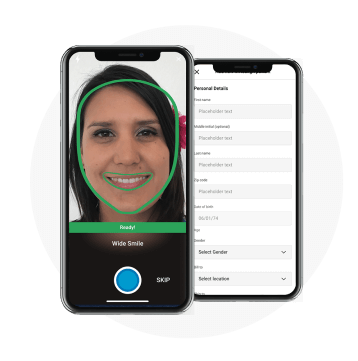
Create patient with Invisalign® Practice App4, Invisalign Practice App syncs with your IDS, so you can take photos, create patient record and upload photos directly to your Invisalign Doctor Site (IDS).
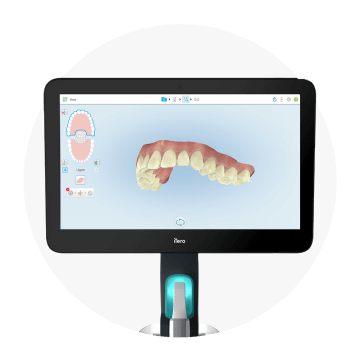
Scan patient
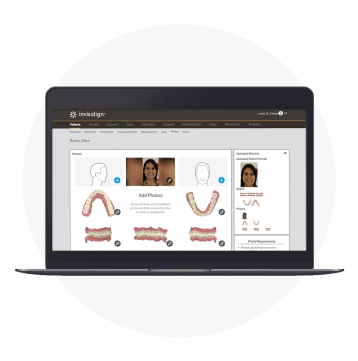
Select auto-uploaded scans in the Invisalign® Doctor Site

Fill prescription and submit
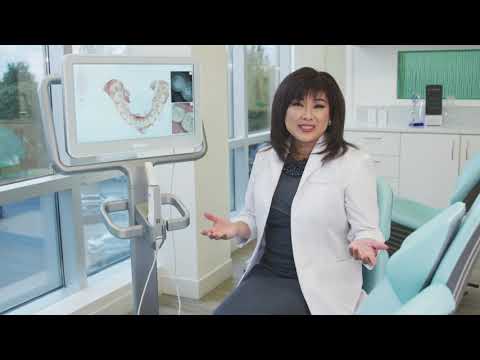
ORTHODONTIC CARE
Dr. Sandra Tai
 British Colombia, CA
“It’s a wow for the patient’s and for the parents who come to our office.”
Discover the efficiency of digital orthodontic treatment.
Slide between scenarios to see just how much of a difference iTero can make in your workflow.

Step 1: Scan your patient
Create digital impressions in minutes.

Step 2: Diagnose and educate
Share your diagnosis and treatment plans with patients to increase case acceptance.

Step 3: Send scans to partners
In minutes.3

Step 4: Receive feedback
Make adjustments as needed and start treatment earlier.

Step 5: Begin treatment and monitor progress
On with the treatment! Keep your patients engaged by sharing progress with your patients at every visit.

Step 1: Gather materials and mix compound
Impression taking may be messy, inconvenient and uncomfortable for gagging patients.

Step 2: Create PVS mold
Rejections may happen if molds are imperfect.

Step 3: Send physical molds to partners
Consider shipping cost, time, and potential damage during shipping and handling.

Step 4: Wait for results
Molds are scanned, and analysed by partners once received. If accepted, skip to step 6.

Step 5: Flawed Impression?
Go back to Step 1.

Step 6: Receive Feedback
Make final adjustments for treatment plan.

Step 7: Start treatment
To assess and monitor treatment progress, return to Step 1.
ITERO BY THE NUMBERS
Did you know...
The iTero network of orthodontists around the world collectively performs over 18,164,887 orthodontic scans every year?5
It all goes to show that seamless and productive workflow starts with iTero solutions.
+scans every month
+scans a day
+scans an hour
We have a solution for your practice.
- 1 Study sponsored by Align Technology. Retrospective data evaluation and quantitative analysis completed by Dr. Michael Mackay, University of Memphis, 2018. 1,076 orthodontists (countries included: AU, AT, BE, CA, CY, CZ, DE, DK, FI, FR, GR, HK, IN, IE, IT, JP, KR, LT, NL, NZ, PL, PR, PT, RE, RU, SK, ES, CH, TW, TH, GB, US, VN) with lowvolume Invisalign usage (defined as 5 or fewer Invisalign receipts in the 12 months prior to acquiring the iTero scanner) who use an iTero Element scanner (at 12 months n = 1,076, at 24 months n = 421 and at 36 months n = 141).
- 2 Valuation based on assumed USD$5,847 Invisalign Case Fee. Case fee varies based on individual treatment needs. APAC average list price for iTero Element = USD$32,840, iTero Element 2 = USD$34,840, iTero Element Flex = USD$32,840. Study based on use of iTero Element model only. Claim based on extrapolation of results to include iTero Element 2 and iTero Element Flex models which utilise the same iTero Element Software. Data on file at Align Technology as of January 8, 2019.
- 3 Based on 10,000 scans, mean transfer time, defined, as the time between the practice sending the iTero scan and the dental laboratory receiving it, is 4.6min. May vary based on internet connection.
- 4 Availability of Invisalign Practice App varies by market, in markets where this is not yet available, Invisalign Photo Uploader can be utilised.
- 5 Monthly, daily, and hourly figures are estimates only, based on total scans per year of 21,689,907 in 2021. Data on file at Align Technology, as of December 31, 2021.
- † After Invisalign treatment. Simulation algorithm also includes teeth whitening.
- ^ Available on the iTero Element 5D imaging systems, which include the iTero Element 5D and iTero Element Plus Series
- * The iTero Element Plus Series is only available within selected markets in APAC including Australia, New Zealand, Japan, Hong Kong, India, Singapore, Thailand, Korea, Taiwan and Vietnam at the moment. The iTero Element Plus Series is not yet available in China, Malaysia, and Philippines.
- # The Invisalign® Outcome Simulator Pro is only available on the iTero ElementTM 5D Plus (Cart and Mobile) scanner models and requires an active service plan. This means that you must have either (i) an initial service plan that comes with your 5D Plus scanner or (ii) be subscribed to payment of a monthly or annual service fee for an orthodontic/restorative iTero Service Plan purchased after the initial service period. Please reach out to an Align Technology Practice Development Manager or iTero Customer Support for more information.
- ** At the independent discretion of the qualified healthcare professional
- * Based on a survey in September 2022 of n = 32 doctor respondents who answered, “Strongly agree" or “Agree" to the following statement: “My practice experienced an increase in Invisalign case starts with usage of Invisalign Outcome Simulator Pro (vs previous workflow & tools).” Those doctors were then asked to estimate the % increase in Invisalign case starts. 50% was the median of all responses. Respondents represent both GPs (n=16) and Orthos (n=16) in NA, EU, and APAC who had utilized Invisalign Outcome Simulator Pro in their workflows ten times or more with their iTero ElementTM Plus Series for an average period of 4 months. Data on File at Align technology, as of October 11, 2022.