Is it time to rethink the DSLR camera workflow for clinical dental photography?
A clinical study compared iTero Lumina™ dental scanner and the Invisalign® Practice App to DSLR photography. Here's what the results mean for your practice.
Authors:
Dr. Efrat Labzovsky is a Senior Global Clinical Research and Development Lead for iTero at Align Technology. She holds a D.M.D. from the Hadassah School of Dental Medicine and an M.H.A. from Bar-Ilan University, and also serves as a clinical instructor at Tel Aviv University.
Dr. Raviv Zary is the Global Clinical Director for iTero at Align Technology and a recognized expert in digital dentistry. With a D.M.D. from Tel Aviv University, he leads global medical affairs and clinical research initiatives.
What clinical research shows about iTero Lumina™ scanner and the Invisalign® Practice App compared to DSLR camera workflows.
Digital dentistry is often described as faster and more efficient — but for many clinicians, the real questions are practical ones:
- Can a simpler capture workflow replace the gold standard for dental photography?
- Can intraoral scanning reduce chair time without compromising image quality?
- Is it reliable enough for everyday orthodontic treatment planning?
To answer these questions, Align Technology conducted a clinical study comparing a fully digital capture workflow — iTero Lumina™ intraoral scanner combined with the Invisalign® Practice App (IPA) — against the current standard of care in orthodontic photography using a DSLR camera.
This article explains why the research was done, how it was conducted, and what the results mean for daily clinical practice.
Why look for an alternative to DSLR clinical photography?
DSLR photography has long been considered the gold standard for clinical documentation and orthodontic records. When executed well, it produces high‑quality images — but it often comes with trade‑offs:
- Complex camera setup and accessories
- Dependence on trained staff and repeatable technique
- Multiple retakes due to lighting, angulation, or focus
- Longer chair time, especially in busy practices
Streamlining the capture process is valuable but only if clinical image quality is maintained.
That’s why this clinical study is focused on a critical question clinicians routinely ask:
Can a digital workflow deliver image quality comparable to DSLR photography — while reducing steps and chair time for orthodontic treatment record taking?
How the clinical study was designed
The study evaluated extraoral and intraoral clinical images captured using:
- Invisalign® Practice App (IPA) for extraoral photography
- iTero Lumina™ dental scanner for intraoral imaging derived from digital 3D models
- DSLR photography as the standard‑of‑care comparator
A total of 65 subjects were included. All images were evaluated using American Board of Orthodontics (ABO) criteria, providing an objective and clinically relevant framework for assessment.
Image quality was assessed by three independent reviewers from the orthodontic department at New York University, using ABO-based criteria widely adopted in dental schools and orthodontic residency programs as the benchmark for clinical photography.
What was assessed
- Overall image quality
- Dentition and occlusion visualization
- Soft tissue representation
- General clinical conditions relevant to orthodontic treatment planning
This ensured the comparison focused on clinical usability, not just technical image resolution.
Can an intraoral scanner and smartphone app-based workflow help streamline clinical records capture compared with a conventional DSLR workflow?
While the study focused on image quality, the workflow differences between the two approaches are worth noting.
Orthodontic record-taking workflow comparison
Both workflows produce the same clinical records. With the iTero Lumina™ dental scanner + Invisalign® Practice App (IPA), the intraoral scan already generates intraoral images, reducing the need for a separate DSLR photo session.
Step | DSLR workflow | iTero Lumina™ scanner + IPA workflow | |
|---|---|---|---|
1 | Same | X-rays | X-rays |
2 | Different tool | Extraoral photos (DSLR) | Extraoral photos (IPA) |
STEP
Key takeaway: Both workflows require the same orthodontic records (X-rays, extraoral photos, intraoral images, digital models). The difference is that the iTero Lumina™ intraoral scan produces both the digital models and the intraoral color images in a single step, reducing the need for a separate DSLR intraoral photography session with retractors, mirrors, and assistant.
- With iTero Lumina™ intraoral scanner and the Invisalign® Practice App, clinicians can:
- Capture extraoral and intraoral records
- Reduce dependency on assistants for photography
- Avoid repeated positioning, lighting adjustments, and retakes
- Move directly from capture to visualization and treatment planning
In contrast, DSLR workflows typically require:
- Dedicated camera equipment and accessories
- Manual setup and adjustments
- Multiple steps before images are ready for use
These workflow differences are reflected in how doctors experience photo capture in daily practice. Align Technology research data shows that 98% of surveyed doctors agree that photo capture with the Invisalign® Practice App requires fewer steps than using a DSLR camera¹, and that 98% agree it is faster than DSLR photography, on average by approximately 74%². Among General Practitioners specifically, the reported time savings increase to around 76% compared to DSLR workflows³.
Fewer steps and guided capture translate directly into shorter chair time, particularly in high‑volume practices where efficiency matters most.
Thinking about the financial impact?
Shorter chair time and more efficient record capture don’t just improve workflows — they can directly affect practice economics. Use the iTero ROI calculator to estimate how digital scanning could impact productivity and return on investment in your own practice.

How does the Invisalign® Practice App perform for extraoral clinical photography?
Invisalign® Practice App delivers superior extraoral photography for orthodontic treatment planning, outperforming traditional DSLR cameras based on American Board of Orthodontics scoring criteria⁴.
In the clinical study:
- The overall mean score for extraoral photos was 52.89 for IPA, compared to 51.14 for DSLR⁴
- Images captured with IPA met or exceeded ABO‑defined clinical quality standards⁴
Extraoral photographs of the same subject captured using (a) DSLR camera and (b) Invisalign Practice App (IPA). From left to right: profile (lateral view), anterior with lips relaxed, anterior smiling, and anterior wide smile
Beyond clinical scoring, doctor preference data reinforces these findings:
- 84% of surveyed General Practitioners and Orthodontists prefer the quality of photos captured with the Invisalign® Practice App over DSLR cameras when submitting Invisalign cases⁵
- This includes 89% of GPs⁶ and 75% of orthodontists⁷ surveyed
For clinicians, this means:
- High-quality extraoral photos without the complexity of a full DSLR setup
- Built-in guidance that helps standardize every capture regardless of who's behind the camera
- Photos that flow directly into the patient record, no manual file transfer needed
How reliable is iTero Lumina™ dental scanner for intraoral imaging compared to DSLR photography?
iTero Lumina™ scanner provides reliable intraoral imaging for orthodontic treatment planning, achieving comparable outcomes to DSLR photography overall, with superior performance in capturing dentition and occlusion, as evaluated based on American Board of Orthodontics criteria⁸.
Study findings showed:
- An overall weighted average intraoral score of 78.41 for iTero Lumina™ scans, compared to 77.27 for DSLR⁸
- Palate image quality comparable to DSLR intraoral photos⁸
- DSLR intraoral photos are currently outperforming iTero Lumina™ scans for mucosa and gingiva⁸. However, that might change in near future as iTeroTM software versions continue to improve, including higher-quality models of the surface representation for both hard and soft tissue.
Intraoral photographs of the same subject captured using (a+b) DSLR camera and (c+d) iTero Lumina scanner.


These results highlight an important distinction:
iTero LuminaTM scanner scored higher for dentition and occlusion, while DSLR retained an advantage for soft tissue. However, intraoral scanner software is regularly updated with improvements in imaging quality and soft tissue rendering.
Improvement in soft tissue capture in the buccal gingival region between an earlier software version (left) and a more advanced version (right).

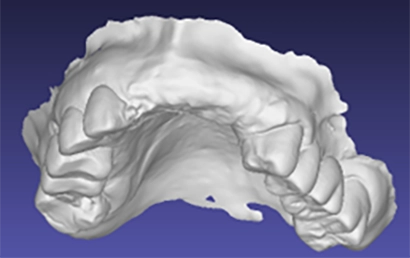


What this means for everyday clinical practice
For clinicians evaluating digital dentistry tools, this study helps clarify what “better” actually means:
- Better efficiency: fewer steps and guided capture¹
- Better chair time management: faster record acquisition with fewer retakes² ³
- Comparable clinical quality: validated using recognized orthodontic evaluation criteria⁴ ⁸
Rather than choosing between speed or image quality, workflows like iTero Lumina™ scanner + Invisalign® Practice App are designed to deliver both.
Frequently Asked Questions
Can an app-and-scanner workflow match DSLR image quality while saving time?
Clinical research shows that digital dentistry workflows can be both faster and clinically reliable, depending on the tools used. In a clinical study comparing a fully digital workflow (iTero Lumina™ scanner and the Invisalign® Practice App) to DSLR photography, digital capture achieved comparable or higher image quality scores while reducing setup steps and retakes. Fewer steps and guided capture support shorter chair time without compromising clinical standards.
Is a scanner-and-app workflow better than a DSLR camera workflow for clinical photography?
“Better” depends on what you’re evaluating. Traditional DSLR photography remains strong for certain image types, such as mucosa and gingiva. However, digital workflows are designed to improve efficiency, consistency, and repeatability in daily practice. When evaluated using American Board of Orthodontics criteria, digital tools like iTero Lumina™ and the Invisalign® Practice App delivered comparable overall clinical outcomes with a simpler workflow.
Which intraoral scanners provide the most realistic color and photorealistic imaging?
Photorealistic imaging depends on both capture technology and evaluation criteria. In the clinical study, extraoral photos captured using the Invisalign® Practice App achieved higher overall mean scores than DSLR photography when evaluated using American Board of Orthodontics criteria, supporting realistic and clinically useful color representation for orthodontic treatment planning.
What scanners make it easier to generate before‑and‑after visualizations for patients?
Digital workflows that combine intraoral scanning with integrated visualization tools make it easier to generate before‑and‑after visuals for patient communication. By capturing records digitally, clinicians can quickly access consistent images that support treatment discussions and help patients better understand proposed outcomes.
How reliable is iTero Lumina™ dental scans for intraoral imaging compared to DSLR photography?
In the clinical study, intraoral images derived from iTero Lumina™ dental scanner achieved an overall weighted average score of 78.41, compared to 77.27 for DSLR photography, when evaluated using American Board of Orthodontics criteria. Results showed superior performance in capturing dentition and occlusion, comparable palate image quality, and lower performance for mucosa and gingiva compared to DSLR intraoral photos.
Does using a digital workflow mean giving up image quality?
No. The study demonstrated that digital workflows can achieve comparable overall clinical image quality to traditional DSLR photography when evaluated using standardized orthodontic criteria. Digital tools are not intended to replace every aspect of traditional photography, but to provide a more efficient and consistent workflow where it matters most for treatment planning.
How can digital dentistry impact the financial performance of a practice?
Digital workflows that reduce chair time and streamline record capture can positively affect practice productivity. Fewer steps and faster capture may allow clinicians to spend more time on patient care. Practices interested in understanding the potential financial impact can use the iTero ROI calculator to assess how digital scanning could affect return on investment in their specific practice setting.
- Based on survey data of Invisalign providers in North America who have used photo capture with the Invisalign® Practice App (previously known as Invisalign Photo Uploader) and DSLR cameras. Survey respondents (n=524; General Practitioners and Orthodontists) were asked whether Invisalign Practice App requires fewer steps than conventional methods, including DSLR photography. Data on file at Align Technology, as of April 20, 2022.
- Based on survey data of Invisalign providers in North America who have used photo capture with the Invisalign® Practice App and DSLR cameras. Survey respondents (n=524; General Practitioners and Orthodontists) were asked whether Invisalign Practice App is faster than conventional methods, including DSLR photography, and to estimate the average time savings. Data on file at Align Technology, as of April 20, 2022.
- Based on survey data of Invisalign‑trained General Practitioners in North America (n=496) who have used photo capture with the Invisalign® Practice App and DSLR cameras. Respondents reported that Invisalign Practice App is faster than DSLR photography, on average by approximately 76%. Data on file at Align Technology, as of April 20, 2022.
- Based on a clinical study (n=65) comparing extraoral photos captured using the Invisalign® Practice App (IPA) and intraoral images derived from digital 3D models captured using iTero Lumina™, against the standard of care in orthodontic photography using a DSLR camera. All images were evaluated using American Board of Orthodontics (ABO) scoring criteria. Data on file at Align Technology, as of December 18, 2025.
- Based on a survey of Invisalign‑trained doctors (n=89; General Practitioners and Orthodontists) who were presented with randomized side‑by‑side images captured using the Invisalign® Practice App and a DSLR camera and asked which photo they felt most comfortable submitting for Invisalign treatment. Data on file at Align Technology, as of April 29, 2022. Based on a survey of Invisalign‑trained General Practitioners (n=62) evaluating preference for photo quality captured with the Invisalign® Practice App compared to DSLR photography when submitting Invisalign cases. Data on file at Align Technology, as of April 29, 2022.
- Based on a survey of Invisalign‑trained Orthodontists (n=27) evaluating preference for photo quality captured with the Invisalign® Practice App compared to DSLR photography when submitting Invisalign cases. Data on file at Align Technology, as of April 29, 2022.
- Based on a clinical study (n=65) comparing intraoral color images derived from digital 3D models captured using iTero Lumina™ to intraoral photographs captured using a DSLR camera. Images were evaluated using American Board of Orthodontics (ABO) criteria. Results showed an overall weighted average score of 78.41 for iTero Lumina™ compared to 77.27 for DSLR photography, with superior performance in capturing dentition and occlusion, comparable palate image quality, and lower performance for mucosa and gingiva. Data on file at Align Technology, as of December 18, 2025.