Does Invisalign® Outcome Simulator Pro really improve Invisalign® treatment case acceptance? What the data says for GP practices.
Based on Align Technology data, GP patients who received Invisalign® Outcome Simulator Pro accepted Invisalign treatment at three times the rate of patients who did not receive it.¹
A patient arrives for a routine exam or hygiene appointment. During the assessment, you notice signs of malocclusion that could benefit from an orthodontic treatment. You explain the issue, point it out using traditional methods, and discuss potential treatment options.
The patient listens, nods, and leaves.
Whether they truly understood the problem or felt motivated to take action remains uncertain.
For many general practitioners, this might be one of the barriers to growing orthodontic treatment within their practice. Patients often struggle to visualize the future benefits of treatment, making it difficult for them to move from interest to action.
Visualization tools, such as Invisalign® Outcome Simulator Pro, can help turn an abstract discussion about tooth movement into a more personal and meaningful conversation.
The 3x conversion finding explained
The analysis found that GP patients who received Invisalign® Outcome Simulator Pro accepted Invisalign treatment at three times the rate of patients who did not receive it¹:
- Practices that were not using Invisalign Outcome Simulator Pro
- Practices that had adopted and incorporated Invisalign Outcome Simulator Pro into their workflow
The analysis found that practices using Invisalign Outcome Simulator Pro achieved three times higher Invisalign conversion compared with practices that did not use the tool¹.
In practical terms, according to this analysis, patients who experience chairside visualization are significantly more likely to say "yes" to treatment.
How can a GP turn patient conversation into a visual experience?
Invisalign Outcome Simulator Pro was designed as a chairside conversion solution that helps practices show patients what their future smile could look like before treatment begins. Rather than relying solely on verbal explanations, clinicians can use powerful visualizations to support patient education and decision-making.
The solution goes beyond traditional tooth-only visualization. Today, practices can leverage multiple visualization modalities, including:
- 3D dental models
- In-face smile visualization using patient photos
- Invisalign Smile Video technology that allows patients to see a simulated future smile in motion
Example of a 3D dental model with Invisalign Outcome Simulator, Front View
Example of an in-face smile visualization with Invisalign Outcome Simulator
Example of a simulated future smile in motion with Invisalign Smile Video
Why advanced visualization tools matter even more for general practitioners?
Many assume that advanced visualization tools are most relevant for orthodontists.
However, orthodontic practices frequently see patients who have already decided to pursue orthodontic treatment. General practitioners, meanwhile, are often the first professionals to identify orthodontic concerns during routine care.
Patients visiting a GP may come for:
- Routine examinations
- Hygiene appointments
- Preventive care
- General dental concerns
- Emergency visits
They are not necessarily seeking orthodontic treatment when they arrive.
Starting with Invisalign® treatment in your practice? Invisalign® Outcome Simulator Pro can help build confidence
General practitioners who are early in their Invisalign journey sometimes feel uncertain about treatment conversations. Historically, they may have relied on mirrors and verbal explanations to communicate orthodontic needs.
Invisalign Outcome Simulator Pro changes that dynamic.
Instead of asking patients to imagine the outcome, clinicians can show it. The visualization becomes a natural part of the consultation process and helps support the discussion. Which in its’ turn can help practices initiate treatment discussions more effectively while creating a more engaging patient experience.
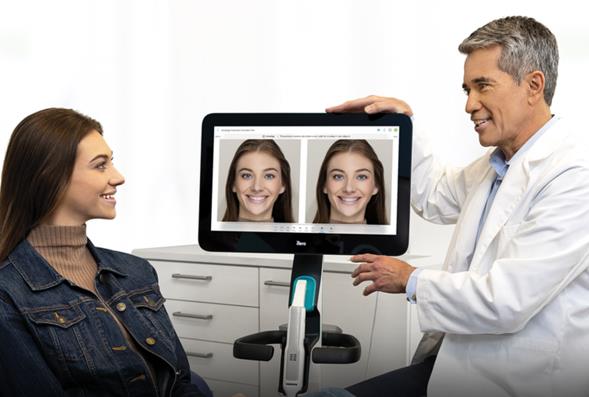
An opportunity for existing iTero™ scanner owners
For practices equipped with a compatible iTero™ scanner, Invisalign® Outcome Simulator Pro is integrated into the iTero workflow, making it easy to incorporate outcome visualization into routine chairside consultations. Clinicians can use the simulation to support discussions about potential Invisalign treatment and help patients visualize possible treatment outcome.
By introducing these conversations during routine appointments, clinicians gain valuable insight into patient interest while delivering a more engaging consultation experience.
Can clinicians visualize potential facial changes alongside Invisalign treatment planning?
For clinicians who want to show more than just tooth-only visualization, 3D Tissue Animation simulates how a patient's facial soft tissue might change by the end of Invisalign treatment. The feature is available within the ClinCheck® workflow², it captures a patient-specific 3D face scan and simulates how facial soft tissues may change by the end of treatment.² See example in the video below:
Clinicians can simulate a patient's potential in:
- Facial balance
- Symmetry
- Vertical proportions
- Lip posture
- Buccal corridors²
The workflow combines patient-specific facial scans, intraoral scans, and optional CBCT information within a single visualization environment.²
Instead of discussing future outcomes using dental anatomy alone, clinicians can show a visualization based on the patient’s own facial records.²
Is 3D Tissue Animation part of Invisalign Outcome Simulator Pro?
No. 3D Tissue Animation is not integrated with Invisalign Outcome Simulator Pro.²
The two capabilities serve different purposes:
- Invisalign Outcome Simulator Pro focuses on visualizing potential Invisalign treatment outcomes in terms of 3D dentition models, in-face smile visualization as a static picture or in motion (with Invisalign Smile Video technology).¹
- 3D Tissue Animation simulates how a patient's facial soft tissue might change by the end of Invisalign treatment.²
What scanners let me easily generate before-and-after visualizations to show patients?
iTero scanners with Invisalign® Outcome Simulator Pro provide visualization tools that can help clinicians show patients a comparison between their current situation and a simulated future treatment outcome.¹²
For possible treatment discussions, clinicians can use Invisalign Outcome Simulator Pro to visualize potential Invisalign treatment outcomes and help patients better understand their treatment options.¹
For treatment-planning discussions, clinicians can use 3D Tissue Animation within ClinCheck® Review Mode to compare initial and projected soft-tissue visualizations, helping patients understand potential soft-tissue changes in facial context.²
According to Align Technology product information, clinicians can review initial and projected views, adjust visualization opacity, and evaluate facial information alongside intraoral and optional CBCT data within the 3D Tissue Animation workflow.²
What scanners have built-in tools for patient education and chairside visualization?
iTero scanners include visualization tools that can support patient education and chairside treatment discussions. One example is Invisalign® Outcome Simulator Pro. It is designed for treatment conversations. It visualizes potential Invisalign treatment outcomes, helping patients understand what treatment could look like before starting. It is typically used during patient consultations when discussing Invisalign treatment options. ¹
Key takeaways for GP Practices
- Based on Align Technology data, GP patients who received Invisalign® Outcome Simulator Pro accepted Invisalign treatment at three times the rate of patients who did not receive it.¹
- Invisalign® Outcome Simulator Pro visualizes potential Invisalign treatment outcomes using 3D Model, In-Face Visualization, and Smile Video.¹
- 3D Tissue Animation adds patient-specific facial visualization within ClinCheck® software.²
- Invisalign® Outcome Simulator Pro and 3D Tissue Animation are separate capabilities within the broader Align Digital Workflow.²
Disclaimers
1. Based on a comparison of accepted ClinCheck® treatment plans from 9.6 million GP patients in cases where Invisalign® Outcome Simulator Pro was used versus cases where it was not used. Invisalign Outcome Simulator Pro visualizes potential Invisalign treatment outcomes using 3D Model, In-Face Visualization, and Smile Video. Data on File at Align Technology, as of November 5, 2025.
2. Visualizations, simulations, and soft-tissue changes are not intended for clinical purposes. Actual results may vary. Capture is available only in the Invisalign Practice App on supported devices (iPhone 10 or newer, iPad, iOS 16+). 3D Face Scan / 3D Tissue Animation viewing is not available in 3D Modification Mode (3D Controls / Plan Editor) and must be viewed in ClinCheck® Review Mode. There is no dedicated export feature to share with patients. 3D Tissue Animation is not integrated with Invisalign Outcome Simulator Pro.